
Every new review, in the channel where your team already works.
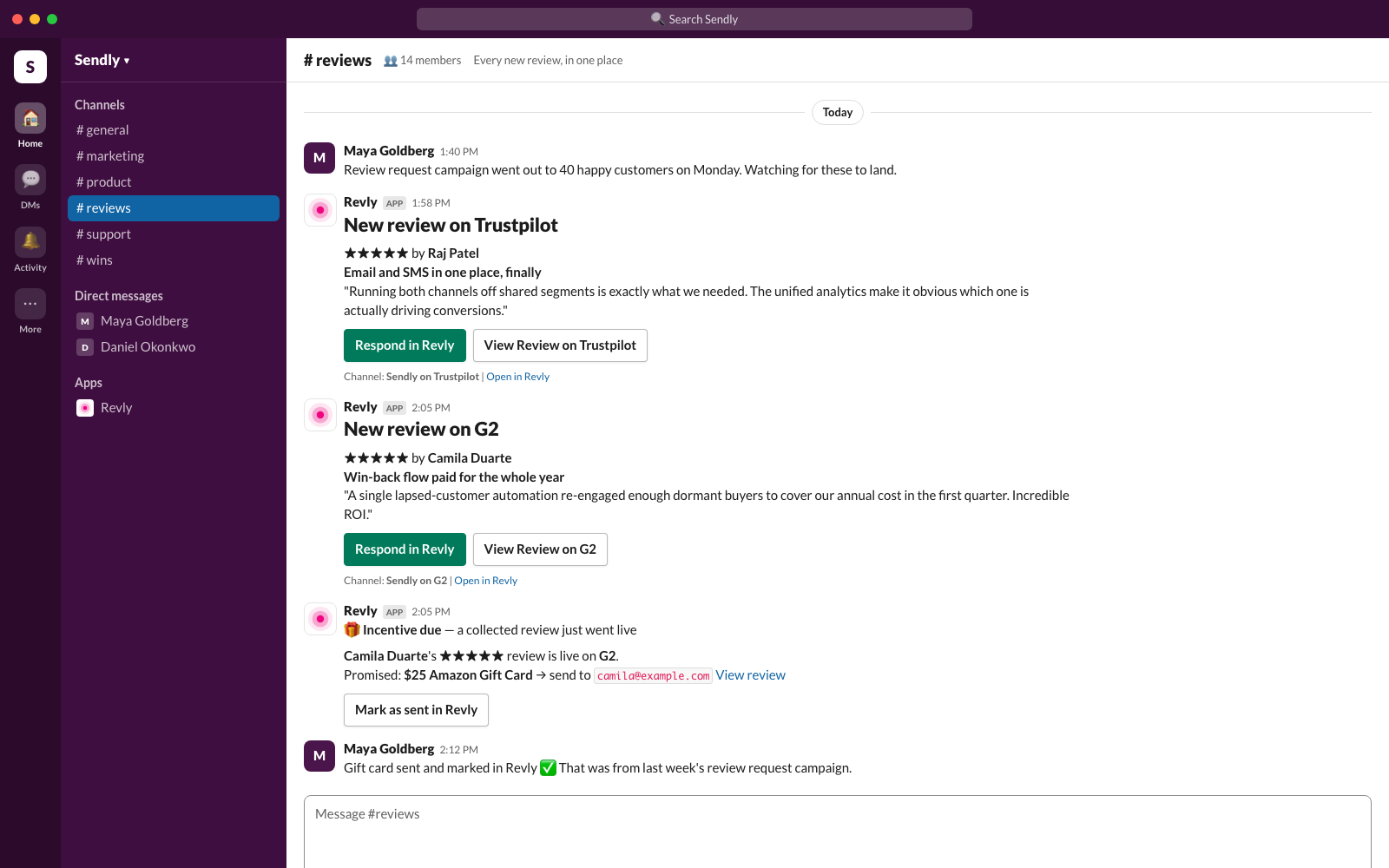
Revly watches your listings on G2, Capterra, Trustpilot, the Shopify App Store, WordPress.org, WooCommerce, Xero and QuickBooks. When a review appears, changes or disappears, Revly posts it to the Slack channel you choose, with the rating, the reviewer's words and a one-click path to respond.
The Add to Slack button is inside the Revly dashboard (Settings → Integrations), so it needs a Revly account on the Pro plan or above. Step-by-step instructions are below.
Review management for software companies, delivered to Slack.
Revly is a review management platform. It collects reviews with one smart link, monitors every marketplace listing you have, and helps you respond. The Slack app is Revly's notification layer: it brings what Revly finds into Slack, so nobody has to check five marketplaces by hand and a two-star review never sits unseen for a week.
Revly monitors
Connect each listing once. Revly checks it on a schedule set by your plan and stores every review it finds, including edits and removals, in one dashboard.
Slack gets the news
Anything new goes to your chosen channel: rating, title, review text and reviewer name, plus buttons to respond in Revly or open the review on the platform.
Your team responds
Respond in Revly opens the review with an AI-drafted reply in your voice, ready to edit and post on the platform, so the answer goes out the same morning.
Everything Revly posts. Nothing else.
Every message comes from a sync: Revly re-reads each connected listing on a schedule set by your plan, or when you press Sync Now, and posts what changed. Revly only ever posts. It does not read messages, answer mentions or slash commands, or send direct messages.
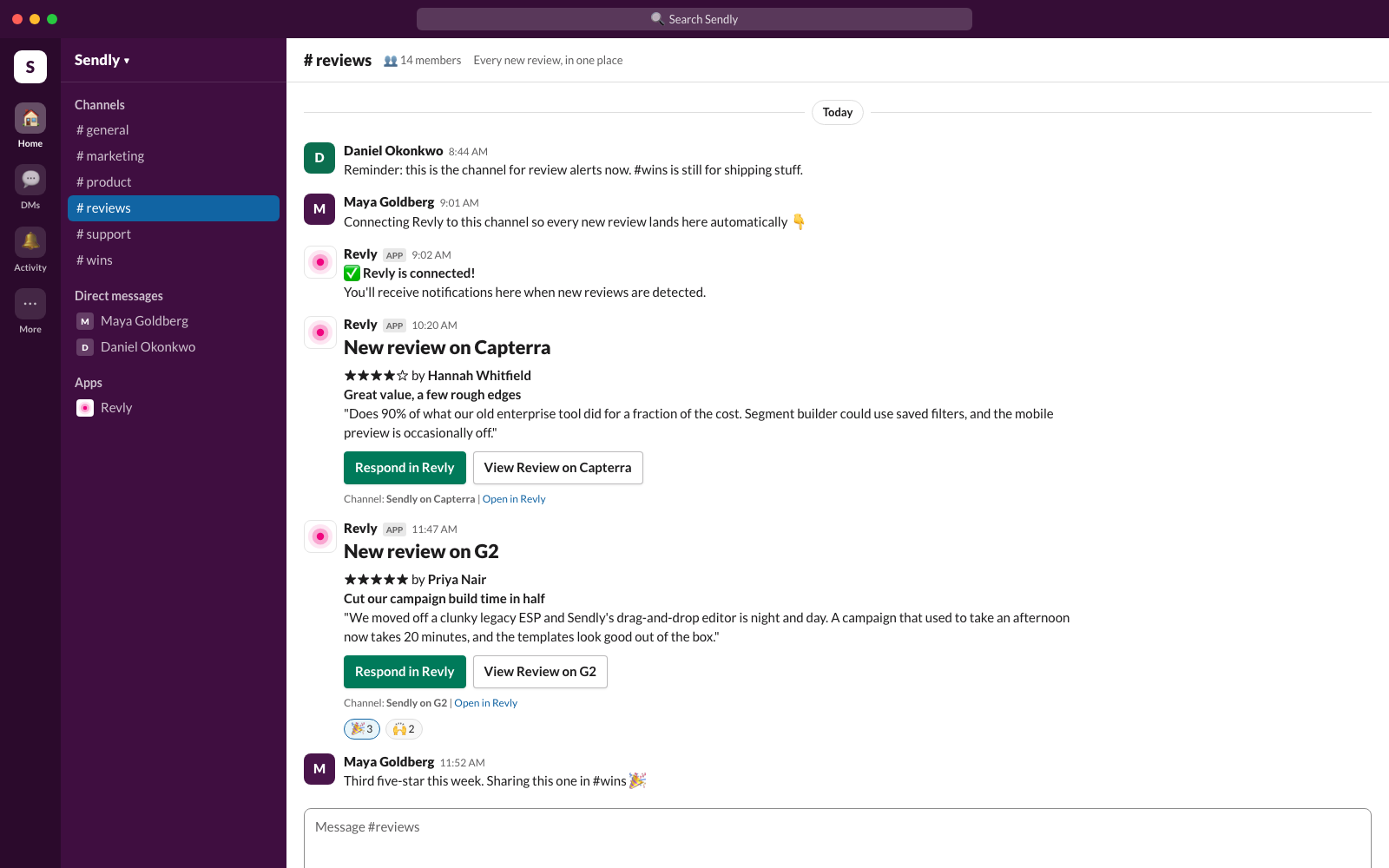
New reviews
One to three new reviews arrive as full cards: the star rating, the review title, the reviewer's name and up to 400 characters of what they wrote. Each card has a Respond in Revly button and a link to the review on the platform.
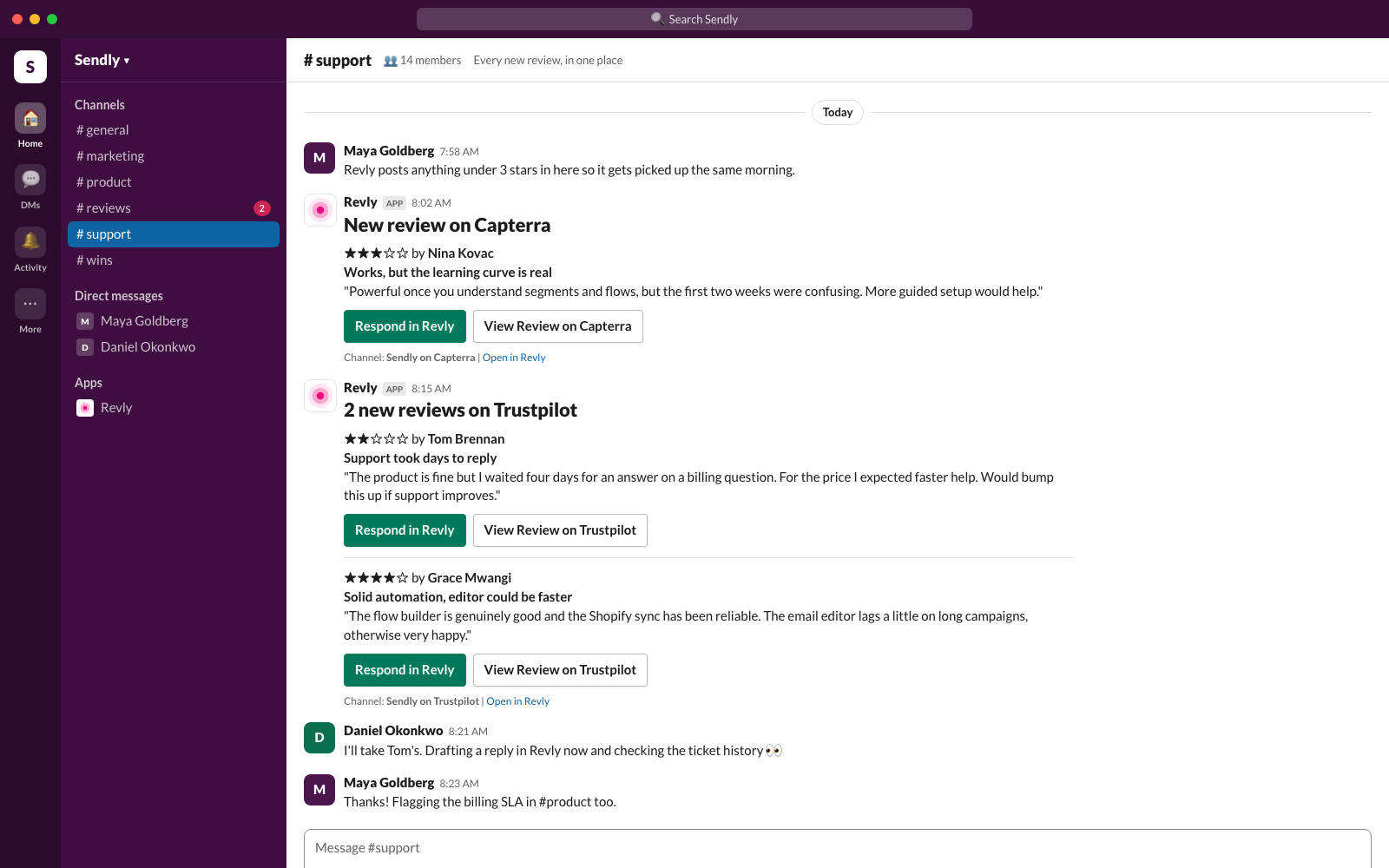
Reviews that need a response
Low ratings arrive the same way, so the person who should reply sees them the moment Revly does. Respond in Revly opens the review in your dashboard with an AI-drafted reply ready to edit.
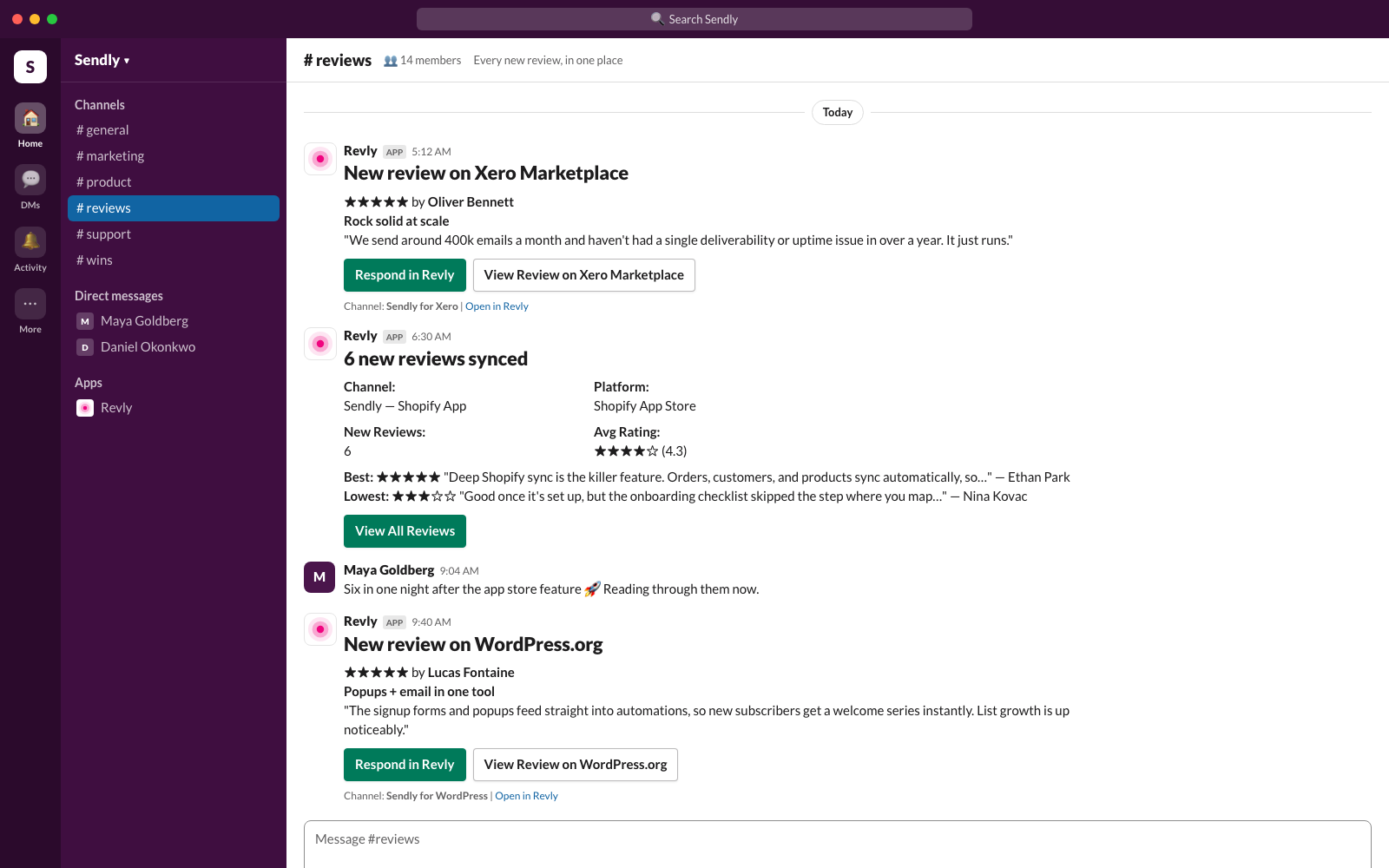
Digest for busy days
When a sync finds four or more new reviews on one listing, Revly posts a single digest instead of flooding the channel: the count, the average rating, the best and the lowest review, and a View All Reviews button.
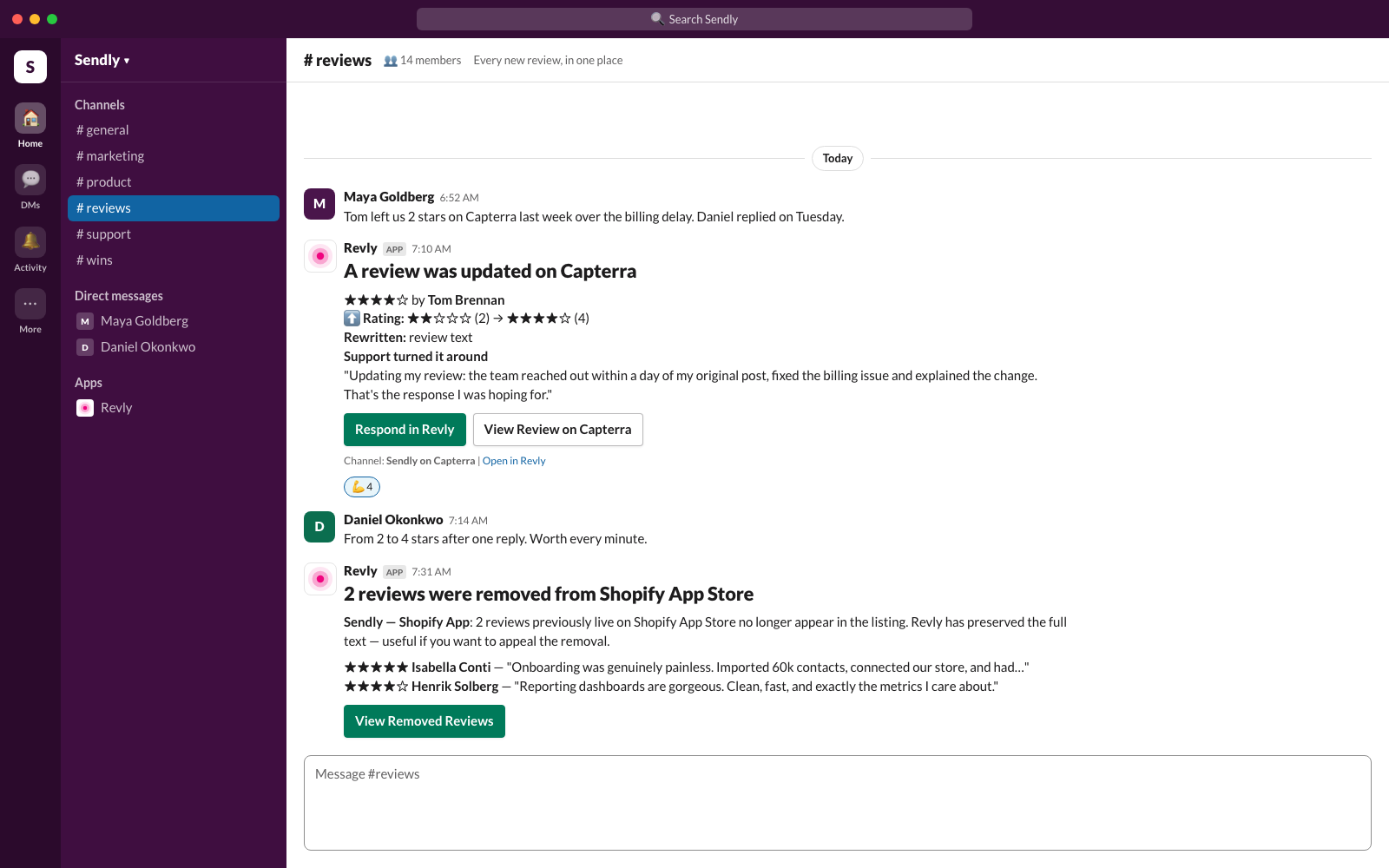
Edited and removed reviews
If a reviewer changes their rating or rewrites their review, Revly posts the before and after. If reviews disappear from a listing, Revly says which ones and keeps the full text so you can appeal.
Incentive reminders
If you collect reviews through a Revly link with a reward attached, Revly tells you the moment a promised review is live, who to send the reward to, and links to mark it as sent.
A test message
Pressing Send Test in Revly Settings posts a short Revly is connected! message, so you can confirm the channel is right before the first real review lands.
Six steps, about two minutes.
The Add to Slack button is inside the Revly dashboard rather than on this page, because the connection belongs to your Revly workspace and only one of its owners or admins can make it. Here is the whole path.
Sign in to Revly
Go to app.revly.io and sign in, or create an account. Slack notifications are included on the Pro plan and above; you can upgrade any time from Settings → Plan & Billing.
Open Settings → Integrations
Choose Settings in the left sidebar, scroll to Integrations, and press Add to Slack on the Slack Notifications card. Only workspace owners and admins see the button.
Approve in Slack
Slack asks which workspace to add Revly to and shows the three permissions it needs (listed below). Press Allow.
Confirm and choose a channel
You are returned to Revly Settings with a Slack connected! confirmation. Pick the channel Revly should post to. Public channels are always listed; private channels appear once Revly has been invited to them.
Invite Revly to the channel
Revly can only post to channels it is a member of. In Slack, open the channel you picked and run /invite @Revly. If you chose a private channel, do this first and press refresh the list in Revly.
Send a test
Press Send Test. A Revly is connected! message appears in the channel within a few seconds. From here on, notifications arrive on their own.
Everything lives in Settings → Integrations.
Change the channel
Press Change Channel, pick another one, and invite Revly to it if it is private. Notifications switch over immediately.
Pause without disconnecting
Pause Notifications stops delivery and keeps the connection. Enable Notifications turns it back on.
Disconnect
Press Disconnect. Revly revokes its token with Slack and deletes the stored connection straight away. Removing the app from Slack's side works too.
Who can manage it
Owners and admins of the Revly workspace. Members see a note asking them to contact an admin.
One channel per workspace
Each Revly workspace connects to one Slack workspace and one channel. Agencies connect each client workspace separately from the company switcher.
What counts as new
A review is announced when Revly first sees it and it was posted within the last 30 days. Older reviews picked up on a first sync or a historical sweep are stored quietly as backfill.
How often Revly checks
Every 6 hours on Pro and every 2 hours on Business and Agency, for most platforms. A few are deliberately slower because each check is expensive to run: G2 and Trustpilot once a day, Capterra every three days. Sync Now in the dashboard checks immediately, on any plan.
If messages stop
Usually one of three things: Revly is no longer a member of the channel (re-invite it), the app was removed from Slack (reconnect from Settings), or the plan no longer includes Slack.
Three permissions. One direction.
Revly asks Slack for the minimum it needs to post to one channel and to let you pick that channel. Data only flows from Revly into Slack.
| Permission | What Revly uses it for |
|---|---|
chat:write | Post review notifications to the channel you choose. This is the only thing Revly writes to Slack. |
channels:read | List your public channels so you can pick one in Settings. |
groups:read | List the private channels Revly has been invited to, for the same picker. |
When you connect, Revly stores your Slack workspace ID and name, the bot token Slack issues (encrypted at rest with AES-256-GCM), the ID and name of the channel you select, and which Revly user made the connection. Revly never reads messages, member profiles, files or anything else in your workspace. Disconnecting revokes the token with Slack and deletes the record immediately; deleting your Revly account does the same. Full details are in our Privacy Policy and Terms of Service.
Questions or support: email hello@revly.io. We reply within one business day.
Included with Pro and above. No extra charge.
The Slack app costs nothing on its own. It is part of every paid Revly plan; the Free plan does not include Slack notifications.
$41/mo billed annually. 5 channels, checks every 6 hours, Slack notifications, AI responses.
$84/mo billed annually. 15 channels, checks every 2 hours, unlimited team members, webhooks and API.
Ten or more managed clients, each with its own Slack connection, consolidated billing.
Common questions
Stop checking five marketplaces.
Let the reviews come to you.
Connect Revly to Slack once. Every new review, edit and removal shows up where your team will actually see it.
Monitor Multiple Review Platforms
All your reviews from every platform in one dashboard, so nothing is missed.
Manage Review Responses
Surface every review that needs a reply and draft one in your voice, across every platform.
Query your review data with AI
Connect Revly to Claude or ChatGPT and ask questions about your review data in plain language.